

Did you know that Firefox offers to create several user profiles for over 10 years? It is not surprising if you had never heard of it before. Unknown to the general public, this feature was mainly used by some initiates.
A profile manager present, but long hidden in Firefox
On Google Chrome for example, users can easily create different profiles to share a computer with several people or simply separate your professional account from your personal account.
From the first versions of Firefox, it was possible to create several users, but it was necessary to go through a command line in the terminal. Internet users had to manually enter the path to the application, then add the “-P” command to access the profile manager.
This manager then made it possible to go from one profile to another, create and delete it. Then Mozilla finally joined the user manager in the browser, but he was in the masked options.
The profile manager finally arrives in the main browser interface
The functionality therefore existed, but it remained discreet and not very visible. Many users even ignored its existence or did not know how to access it, especially when they were used to Chrome.
It would seem that the Mozilla Foundation has just realized the importance of the user manager for Internet users. The notes of the update to version 138 of Firefox confirm this.
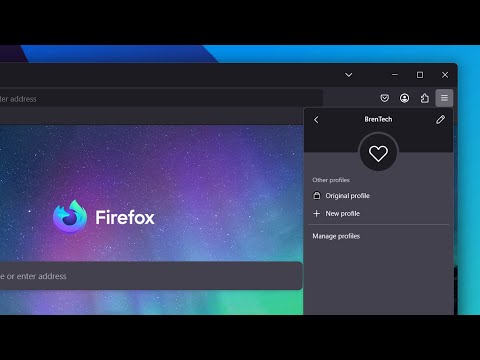
As Mozilla explains, “you can now name your profiles and personalize them with avatars and color themes for easy recognition, then quickly switch between them, while keeping the bookmarks, tabs and completely separated navigation history”.
Internet users can easily manage, personalize and synchronize profiles
This manager will be directly accessible from the toolbar, by clicking on the account icon. This menu allows you to quickly go from one profile to another, add a new one and delete them.
It will also be possible to synchronize data from a new profile with other devices connected to the same Mozilla account. Another function of choosing the default launch profile when opening Firefox.
And if the profile manager does not yet appear, don't worry. The functionality is being deployed progressive.
How to activate the profile manager now on Firefox?
In the meantime, you can access the manager by typing “About: Config” in the address bar to open the masked options. Then search for the “Browser.profiled.Enabled” option, then change its “False” value to “True”.
The last step is to restart Firefox to apply the new option. You will then see the account icon to the right of the navigation bar.
Among the other new features of Firefox 138, Internet users will also have access to the creation of groups of tabs to organize their web browsing. Weather suggestions will also be displayed in the address bar when Internet users type terms related to the weather or the names of the cities.

With an unwavering passion for local news, Christopher leads our editorial team with integrity and dedication. With over 20 years’ experience, he is the backbone of Wouldsayso, ensuring that we stay true to our mission to inform.


